Choosing between Shopify and WooCommerce can feel overwhelming. Both platforms power millions of online stores worldwide but they take completely different approaches to eCommerce. In this detailed comparison we break down everything you need to know about Shopify vs WooCommerce to help you make the right choice for your business in 2026.
Why This Comparison Matters
When it comes to building your online store the platform you choose becomes the foundation of your entire business. According to recent market data WooCommerce powers approximately 6.5 million live websites and holds around 33.4% of the global eCommerce market share while Shopify powers nearly 5 million online stores with about 28% market share among high-traffic websites.
Both platforms are excellent choices but they are built for different types of businesses. Shopify is an all-in-one hosted solution that handles everything for you while WooCommerce is a free WordPress plugin that gives you complete control over every aspect of your store. Let us explore which one is right for you.
Quick Comparison at a Glance
Before we dive into the details here is a quick overview of how Shopify and WooCommerce compare:
Feature | Shopify | WooCommerce |
Platform Type | Hosted solution | WordPress plugin |
Starting Price | $29 per month annual | Free plugin plus hosting |
Ease of Use | Beginner friendly | Requires technical knowledge |
Customization | Limited to themes and apps | Unlimited customization |
Support | 24/7 support available | Community support |
Best For | Quick setup scaling businesses | Full control budget conscious |
What is Shopify?
Shopify is an all-in-one hosted eCommerce platform that lets you create customize and manage your online store without worrying about technical details. Think of it as a complete package where everything is included: hosting security payment processing and customer support.
Founded in 2006 Shopify has grown to power nearly 5 million online stores worldwide. The platform is designed to be user friendly allowing anyone to set up a professional online store in a matter of hours even without technical knowledge.
Key Features of Shopify
• All-in-one solution with hosting security and SSL certificate included.
• Built-in payment processing through Shopify Payments.
• 24/7 customer support via live chat phone and email.
• Over 8000 apps available in the Shopify App Store.
• Mobile app for managing your store on the go.
• Advanced inventory management and shipping features.
• Built-in analytics and reporting tools.
• Point of Sale POS system for in-person sales.
What is WooCommerce?
WooCommerce is a free open-source eCommerce plugin built specifically for WordPress. Instead of being a standalone platform WooCommerce transforms your existing WordPress website into a fully functional online store.
Launched in 2011 WooCommerce has become the most popular eCommerce plugin in the world with over 6.5 million active installations and more than 211 million total downloads. It powers approximately 30% of all online stores globally making it the leading eCommerce solution by market share.
Key Features of WooCommerce
• Completely free to download and use open-source.
• Unlimited customization options with full code access.
• Over 1200 premium extensions and thousands of free plugins.
• Integration with 30+ payment gateways.
• Complete control over your data and hosting.
• Seamless integration with WordPress content management.
• No transaction fees besides payment gateway fees.
• Massive community support and documentation.
Detailed Comparison: Shopify vs WooCommerce
Now that we understand what each platform offers let us dive into a detailed comparison across the most important factors for your business.
1. Pricing and Costs
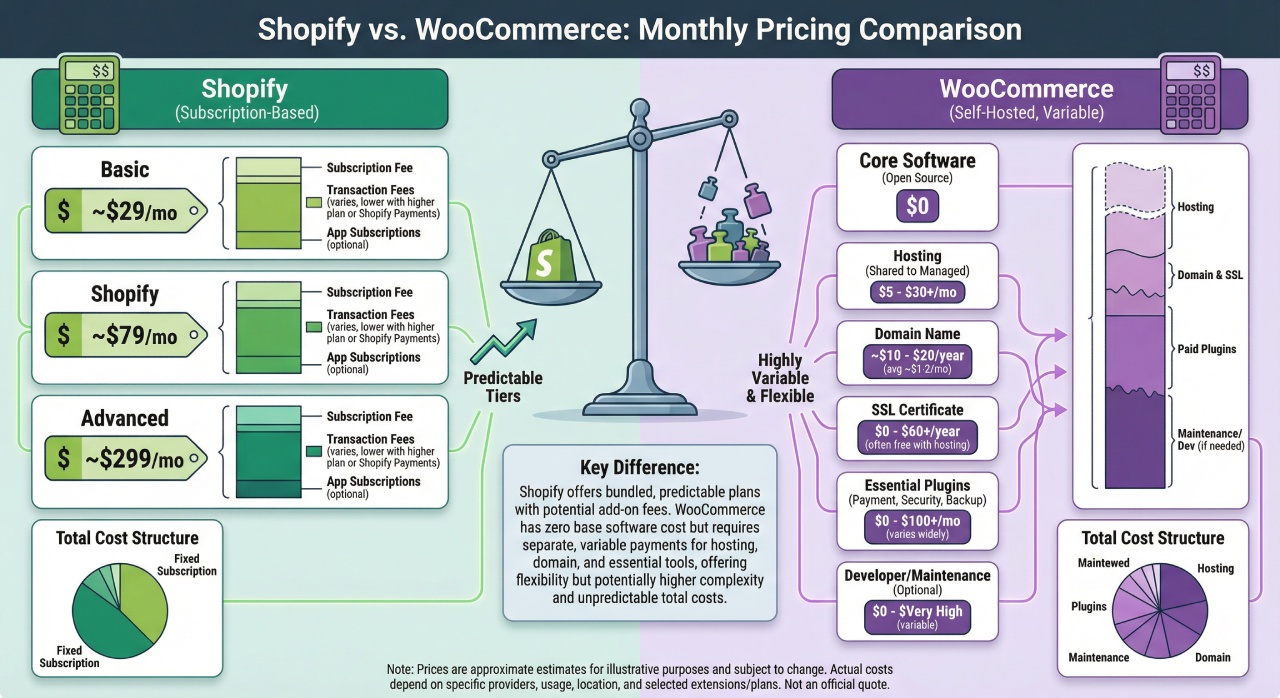
Shopify Pricing: Shopify offers straightforward pricing with four main plans as of 2026:
• Starter Plan: $5 per month limited features checkout links only.
• Basic Plan: $29 per month billed annually or $39 per month billed monthly.
• Grow Plan: $79 per month billed annually or $105 per month billed monthly.
• Advanced Plan: $299 per month billed annually or $399 per month billed monthly.
• Plus Plan: Starting at $2300 per month for enterprise businesses.
Transaction fees vary by plan. If you use Shopify Payments there are no additional transaction fees.
However if you use a third-party payment gateway Shopify charges 2% on the Basic plan 1% on the Grow plan and 0.5% on the Advanced plan.
Credit card rates through Shopify Payments range from 2.9% + 30 cents per transaction on the Basic plan to 2.5% +30 cents on the Advanced plan.
Additional Shopify Costs:
• Premium themes: $100 to $360 one-time purchase.
• Paid apps: $5 to $100+ per month per app.
• Custom domain: $11 to $14 per year (optional) can use existing domain.
WooCommerce Pricing: WooCommerce itself is completely free to download and use. However you will need to pay for certain essentials:
• Web hosting: $3 to $50+ per month depending on provider and plan.
• Domain name: $10 to $15 per year
• SSL certificate: Usually free with hosting or $50 to $100 per year.
• Premium theme: $30 to $100 one-time purchase.
• Premium Plugins: Varies widely $0 to $300+ per plugin.
Payment processing fees depend on your chosen payment gateway. WooPayments WooCommerce official payment solution charges 2.9% + 30 cents per transaction similar to Shopify rates.
The Verdict: For predictable monthly costs Shopify wins. For long-term cost savings and budget flexibility WooCommerce is typically cheaper especially as your business grows. A basic WooCommerce store can run for $15 to $30 per month while Shopify starts at $29 per month plus app costs.
2. Ease of Use and Setup
Shopify: Shopify is designed with beginners in mind. You can have a store up and running in less than an hour. The platform provides a step-by-step setup wizard that guides you through:
• Creating your account and store name
• Choosing and customizing a theme
• Adding products
• Setting up payment methods
• Configuring shipping options
The Shopify dashboard is intuitive and clean. Everything is organized in a logical menu on the left side making it easy to find what you need. Product creation is straightforward and the drag-and-drop theme editor makes customization simple without touching code.
WooCommerce: WooCommerce has a steeper learning curve especially if you are not familiar with WordPress. The setup process involves:
• Purchasing hosting and a domain name
• Installing WordPress on your hosting account
• Installing and activating the WooCommerce plugin
• Running through the WooCommerce setup wizard
• Configuring various settings across WordPress and WooCommerce
While WooCommerce does provide a setup wizard the overall interface can feel cluttered because you are working within the WordPress dashboard which was not originally designed for eCommerce. You will find yourself navigating between WordPress settings WooCommerce settings and plugin configurations.
The Verdict: Shopify is significantly easier to use especially for beginners. WooCommerce offers more power and flexibility but requires more technical knowledge and time to set up properly.
3. Customization and Flexibility
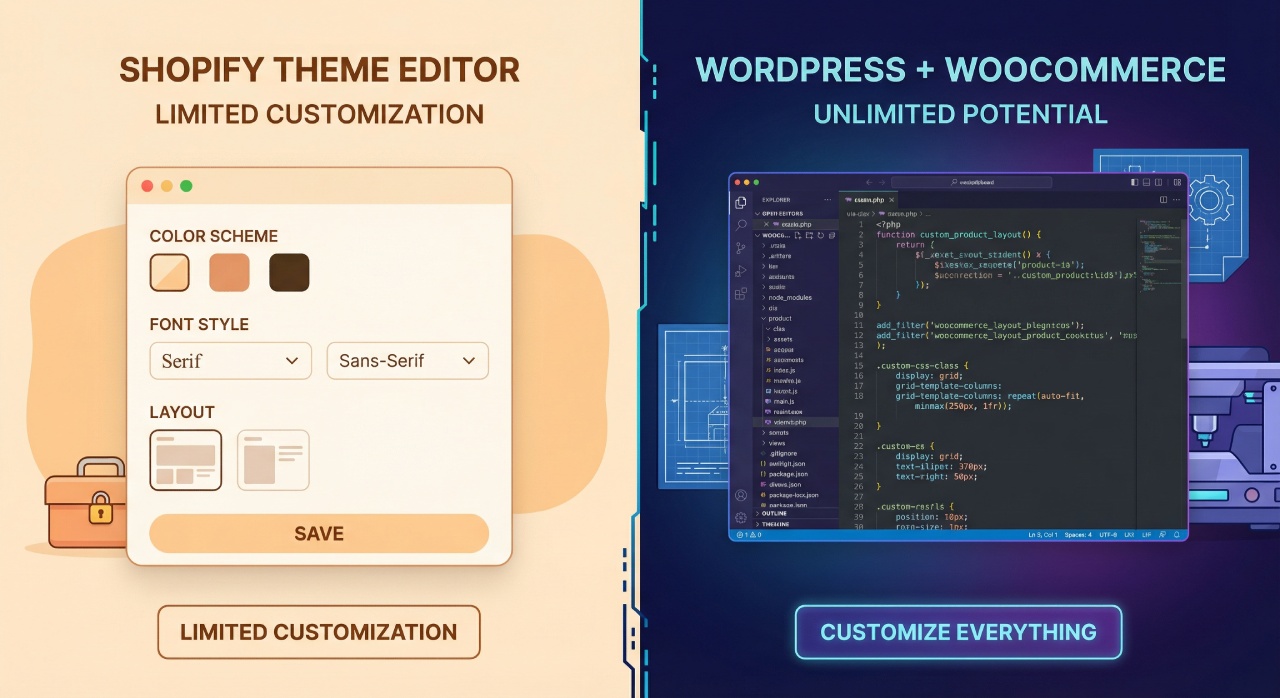
Shopify: Shopify offers good customization options within its framework. You can choose from over 120 themes both free and paid and customize them using the theme editor. For more advanced customization you can edit the Liquid code Shopify templating language.
However there are limitations. Shopify controls the underlying infrastructure so you are working within their system. Some customizations require apps and certain deep-level changes simply are not possible without workarounds.
WooCommerce: WooCommerce offers virtually unlimited customization potential. Since it is open-source and runs on WordPress you have complete access to every file database and line of code. You can:
• Modify any aspect of your store functionality
• Choose from thousands of WordPress themes
• Use page builders like Elementor or Divi for visual customization
• Install any plugin from the vast WordPress ecosystem
• Create custom post types and taxonomies
This level of flexibility is unmatched but it also requires technical knowledge or hiring a developer for complex customizations.
The Verdict: WooCommerce wins for customization and flexibility. If you want complete control over every aspect of your store WooCommerce is the clear choice. Shopify is perfect if you want good customization options without the complexity.
4. Apps Plugins and Extensions
Shopify: The Shopify App Store features over 8000 apps covering everything from email marketing and SEO to inventory management and customer reviews. Most Shopify apps are paid with monthly subscription fees ranging from $5 to $100+. This can add up quickly as your needs grow.
WooCommerce: WooCommerce benefits from the entire WordPress plugin ecosystem which includes over 59000 free plugins. The official WooCommerce Marketplace offers 1200+ premium extensions. Many WooCommerce extensions are one-time purchases rather than recurring subscriptions which can save money long-term.
The Verdict: Both platforms offer extensive ecosystems. WooCommerce has more options especially free ones and often features one-time purchase pricing. Shopify apps are more curated and easier to integrate but typically require ongoing monthly payments.
5. Payment Processing and Transaction Fees
Shopify: Shopify has its own payment processor called Shopify Payments powered by Stripe. If you use Shopify Payments you avoid additional transaction fees and only pay the credit card processing rate 2.9% to 2.5% + 30 cents depending on your plan. However if you choose to use a third-party payment gateway Shopify adds an extra transaction fee 0.5% to 2% on top of the payment gateway fees.
WooCommerce: WooCommerce does not charge any transaction fees. You only pay the fees charged by your chosen payment gateway. WooCommerce supports over 30 payment gateways. You can even set up direct bank transfers or cash on delivery without any online processing fees.
The Verdict: WooCommerce wins on payment flexibility and avoids platform transaction fees. However Shopify Payments is incredibly convenient and competitively priced if you do not mind using their system.
6. SEO and Marketing Capabilities
Shopify: Shopify provides solid built-in SEO features including customizable title tags meta descriptions and automatic sitemap generation. The platform is fast and mobile-optimized which are important ranking factors. However Shopify blogging capabilities are basic compared to WordPress.
WooCommerce: WooCommerce runs on WordPress which is arguably the best platform for SEO and content marketing. WordPress powers 43.2% of all websites on the internet partly because of its SEO capabilities. You can use powerful SEO plugins like Yoast SEO or Rank Math to optimize every aspect of your site. The blogging functionality is far superior making it easy to create comprehensive content strategies.
The Verdict: WooCommerce is the clear winner for SEO and content marketing. The combination of WordPress powerful CMS and advanced SEO plugins gives you more control over your site search engine performance.
7. Performance and Page Speed
Shopify: Shopify takes care of all performance optimization for you. Their servers are fast and they use a global CDN Content Delivery Network to ensure your store loads quickly worldwide. Shopify stores typically score well on speed tests without requiring any additional optimization.
WooCommerce: WooCommerce performance depends entirely on your hosting provider theme choice and how well you optimize your site. A poorly optimized WooCommerce site can be slow but a well-optimized one can be extremely fast. You will need to manage caching plugins image optimization database optimization and CDN setup.
The Verdict: Shopify wins for hands-off performance optimization. WooCommerce can match or exceed Shopify speed but requires more technical work and the right hosting setup.
8. Security and Maintenance
Shopify: Shopify handles all security updates SSL certificates PCI compliance and server maintenance automatically. Your store is always up-to-date and secure without any effort on your part. Shopify is Level 1 PCI DSS compliant meaning it meets the highest security standards for processing credit card information.
WooCommerce: With WooCommerce security is your responsibility. You need to keep WordPress WooCommerce and all plugins updated install security plugins maintain regular backups configure proper file permissions and monitor for vulnerabilities. Studies show that over 25% of WooCommerce sites fail basic security tests often due to outdated plugins or poor security practices.
The Verdict: Shopify is the clear winner for security and maintenance. Unless you are technically savvy or willing to hire someone for ongoing maintenance Shopify hands-off approach is much safer.
9. Customer Support
Shopify: Shopify offers 24/7 customer support through multiple channels: live chat with AI-powered responses phone support email support and extensive documentation and guides. The support team can help with platform-specific issues technical problems and general guidance.
WooCommerce: WooCommerce relies on community support. There is no phone number or official support ticket system. Instead you have community forums documentation and tutorials Facebook groups and Reddit communities and support from your hosting provider which varies by host. If you purchase premium extensions those developers typically provide support for their specific products.
The Verdict: Shopify wins decisively on customer support. Having 24/7 professional support can be invaluable especially when you are facing urgent issues.
10. Scalability and Growth Potential
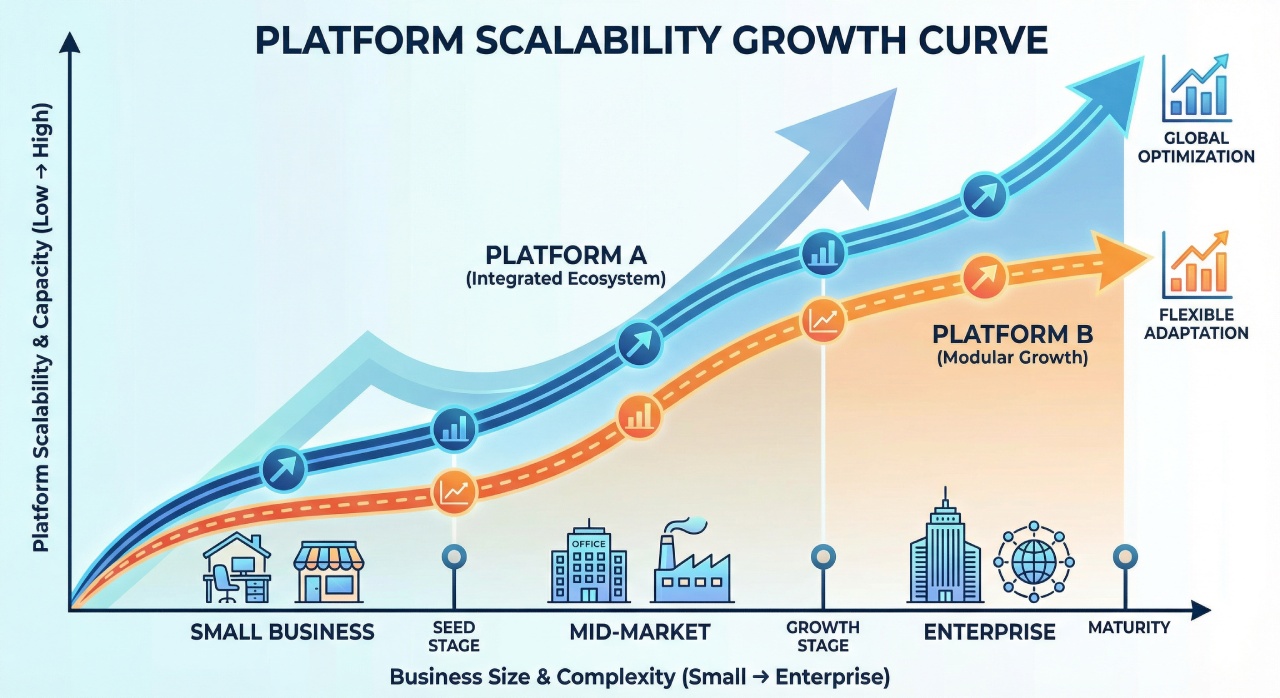
Shopify: Shopify excels at scalability. The platform can handle everything from small startups to enterprise-level operations. Major brands like Gymshark Allbirds and Fashion Nova run on Shopify. As your business grows you can upgrade to higher-tier plans and Shopify Plus offers enterprise-level features for high-volume merchants. The infrastructure automatically scales to handle traffic spikes during sales or busy seasons.
WooCommerce: WooCommerce can also scale to handle large operations but it requires more proactive management. As your store grows you will need to upgrade to more powerful hosting optimize database and queries implement caching strategies and potentially move to managed WordPress hosting. However the flexibility of WooCommerce means you can customize your infrastructure exactly as needed for your specific business model.
The Verdict: Both platforms can scale successfully. Shopify makes scaling effortless while WooCommerce offers more control but requires technical expertise as you grow.
Which Platform Should You Choose?
Now that we have compared both platforms across all major factors let us help you decide which one is right for your business.
Choose Shopify If:
• You want to get your store up and running quickly with minimal technical hassle.
• You prefer an all-in-one solution where everything is managed for you.
• You do not have technical knowledge or do not want to deal with hosting and maintenance.
• You value 24/7 customer support and want someone to help when issues arise.
• Your primary focus is selling products rather than content marketing.
• You want a platform that scales effortlessly as your business grows.
• You prefer predictable monthly costs.
• You are comfortable using Shopify Payments or do not mind the extra transaction fees.
Perfect for: Beginners growing businesses dropshippers entrepreneurs who want to focus on marketing and sales rather than technical details.
Choose WooCommerce If:
• You want complete control over every aspect of your online store.
• You already have a WordPress website or are comfortable with WordPress.
• Budget flexibility is important and you want to minimize long-term costs.
• You have technical knowledge or access to developers.
• Content marketing and SEO are crucial parts of your business strategy.
• You want to avoid transaction fees and have freedom in choosing payment gateways.
• You need highly customized functionality that goes beyond standard eCommerce.
• You want to own your data and have full control over your hosting.
Perfect for: Tech-savvy entrepreneurs businesses with existing WordPress sites content-heavy businesses budget-conscious startups businesses needing deep customization.
Pros and Cons Summary
Let us break down the advantages and disadvantages of each platform:
Shopify Pros:
• Extremely user-friendly and easy to set up.
• All-in-one solution with hosting security and maintenance included.
• 24/7 customer support available.
• Excellent scalability for growing businesses.
• Built-in payment processing with Shopify Payments.
• Fast page load speeds and reliable uptime.
• Strong built-in sales and inventory features.
• Professional Point of Sale POS system for physical stores.
Shopify Cons:
• Monthly fees can be expensive especially with multiple apps.
• Transaction fees if you do not use Shopify Payments.
• Limited customization compared to open-source platforms.
• Basic blogging capabilities.
• You do not own the platform or have access to source code.
• Costs can escalate as you need more apps and features.
WooCommerce Pros:
• Free core plugin with no monthly subscription fees.
• Complete control over every aspect of your store.
• Unlimited customization possibilities.
• No transaction fees from the platform.
• Excellent for content marketing and SEO.
• Access to thousands of free plugins and themes.
• You own your data and platform.
• Lower long-term costs for established businesses.
WooCommerce Cons:
• Steeper learning curve especially for beginners.
• Requires separate hosting and domain purchase.
• You are responsible for security updates and maintenance.
• No dedicated customer support community-based.
• Performance depends on your hosting and optimization efforts.
• Can become complex with too many plugins.
• Requires technical knowledge for advanced customizations.
Real Cost Comparison: 1 Year
Let us look at realistic costs for running each platform in your first year:
Cost Item | Shopify Basic | WooCommerce |
Platform Hosting | $348 per year | $180 per year |
Domain Name | $14 per year | $14 per year |
Theme | $0 to $180 one-time | $0 to $70 one-time |
Apps/Plugins (Optional) | $360 to $1200 per year | $0 to $300 per year |
SSL Certificate | Included | Usually included |
1 Year Total Approx. Cost | $722 to $1742 | $194 to $564 |
Note: These costs do not include payment processing fees which are similar on both platforms at around 2.9% + 30 cents per transaction.
Can You Switch Between Platforms?
Yes you can migrate from one platform to another but it requires careful planning. Both directions are possible:
Migrating from WooCommerce to Shopify: There are several migration apps and services available that can transfer your products customers and orders. However custom functionality may need to be recreated. Services like LitExtension specialize in this type of migration.
Migrating from Shopify to WooCommerce: This is also possible using migration tools but you will need to set up hosting and WordPress first. Your theme and design will need to be recreated in WordPress.
Important: Migration should not be taken lightly. It requires downtime testing and can affect your SEO rankings temporarily. Choose your platform carefully from the start.
Final Recommendations by Business Type
Based on our comprehensive analysis here are our recommendations for different business scenarios:
For Dropshipping Businesses: [Shopify] – The integrations with Oberlo Spocket and other dropshipping apps are superior and the ease of use lets you focus on finding products and marketing.
For Content-Heavy Businesses: [WooCommerce] – If blogging and content marketing are central to your strategy WordPress superior content management capabilities make WooCommerce the clear winner.
For Budget-Conscious Startups: [WooCommerce] – The lower ongoing costs make it more attractive when you are watching every dollar as long as you have some technical ability.
For Rapid Growth Businesses: [Shopify] – The scalability reliability and built-in features mean you can focus on growth without worrying about infrastructure.
For Businesses Needing Custom Functionality: [WooCommerce] – The open-source nature and unlimited customization options make it ideal for unique business requirements.
For Businesses With Physical Stores: [Shopify] – Shopify POS is one of the best point-of-sale systems available making it perfect for omnichannel retail.
For Absolute Beginners: [Shopify] – The learning curve is much gentler and the 24/7 support means help is always available when you need it.
For Tech-Savvy Entrepreneurs: [WooCommerce] – If you enjoy tinkering and want maximum control WooCommerce flexibility will serve you well.
Conclusion
Both Shopify and WooCommerce are excellent eCommerce platforms but they serve different needs. Shopify is the better choice for most people who want a hassle-free all-in-one solution that just works. It is particularly well-suited for beginners growing businesses and anyone who wants to focus on selling rather than managing technology.
WooCommerce is the superior option for those who want complete control have technical knowledge prioritize content marketing or are working with a tight budget. The flexibility and cost savings can be significant especially as your business matures.
The good news is that both platforms power millions of successful online stores so you cannot really go wrong with either choice. The key is to honestly assess your needs technical abilities and long-term goals.
[Remember]: The best platform is the one that you will actually use and that aligns with your business model. Do not let analysis paralysis stop you from getting started. Both platforms offer free trials so you can test them out before making a commitment.
Ready to Start Your Online Store?
Now that you have all the information you need about Shopify vs WooCommerce it is time to take action. Here are your next steps:
For Shopify: Start with their 3-day free trial no credit card required and explore the platform. Take advantage of the $1 per month offer for the first 3 months to test it properly.
For WooCommerce: Choose a reliable hosting provider we recommend Hostinger, Bluehost or SiteGround for beginners install WordPress and add WooCommerce for free.
The most important thing is to get started. Do not let perfectionism hold you back. You can always adjust and optimize as you learn what works best for your business.
Need more eCommerce tips and platform comparisons? Follow us for regular updates tutorials and expert insights to help you build a successful online business.
Frequently Asked Questions
1. Is WooCommerce really free?
2. Which platform is better for SEO?
However Shopify also offers solid SEO features and can rank well with proper optimization.
3. Can I use my own domain with both platforms?
4. Which platform handles more traffic better?
5. Do I need coding knowledge for either platform?
6. Which platform is cheaper in the long run?
7. Can I sell digital products on both platforms?
8. Which is better for international sales?
Confused which platform suits your business? Get expert help from ShopifyGems – Contact Us